
Liquid in Charging Port: Causes, Risks & Quick Fixes

Have you ever noticed a strange warning on your phone saying there’s liquid in your charging port? It can be frustrating and worrying, especially when you need to charge your device quickly.
If your phone has shown this warning before, you may also want to read our guide on what to do if your phone gets wet to avoid long-term damage. But don’t panic just yet. Understanding why liquid gets into your charging port and what you can do about it could save your phone from serious damage. Keep reading to learn simple, effective steps that will protect your device and keep it working smoothly.
Your phone’s health depends on it.
Common Causes of Liquid in Charging Port
Liquid in the charging port is a common issue for many device users. It can cause charging problems and damage the device. Understanding the causes helps prevent this problem.
Exposure to Moisture and Water
Moisture can enter the charging port from rain or wet surfaces. Even small amounts of water can cause issues. Devices left in damp places are at higher risk. Moisture creates corrosion and shorts inside the port.
Sweat and High Humidity
Sweat from hands or face can drip into the charging port. High humidity environments increase moisture in the air. This moisture can settle inside the port over time. Sweat and humidity often lead to slow corrosion.
Accidental Liquid Spills
Spilling drinks like water, coffee, or juice is common. Liquid quickly seeps into the small openings of the port. Sticky or sugary liquids cause more harm than plain water. Spills often need quick cleaning to avoid damage.
Environmental and Weather Factors
Dust and dirt combined with moisture harm the charging port. Coastal areas have salty air that speeds up corrosion. Cold weather causes condensation inside devices. These environmental factors weaken port connections over time.

Credit: www.reddit.com
Risks of Liquid in the Charging Port
Liquid in the charging port can cause many problems for your device. It may not seem serious at first. But small amounts of moisture can lead to big issues. Understanding these risks helps you protect your device better. According to Apple’s official guidance on liquid detection warnings, charging a wet device can permanently damage internal components.
Short Circuit and Electrical Damage
Liquid can cause short circuits inside the charging port. This happens when water connects two points that should stay separate. Short circuits can stop your device from working. They may also damage the battery or other parts.
Corrosion Inside Charging Port
Water can cause corrosion on metal parts inside the port. Corrosion slowly breaks down the metal. This can stop the charger from making a good connection. Over time, corrosion can ruin the charging port completely.
Charging and Battery Malfunctions
Liquid can interfere with the charging process. Your device may charge slowly or stop charging at all. Sometimes, the device might say it is charging, but the battery does not increase. This problem can confuse many users.
Overheating Issues from Wet Charging Port
Water in the port can cause the device to overheat. Overheating can damage the battery and other internal parts. It can also make the device unsafe to use. Overheating devices may shut down suddenly to prevent damage.
Immediate Actions for Liquid in Charging Port Warning
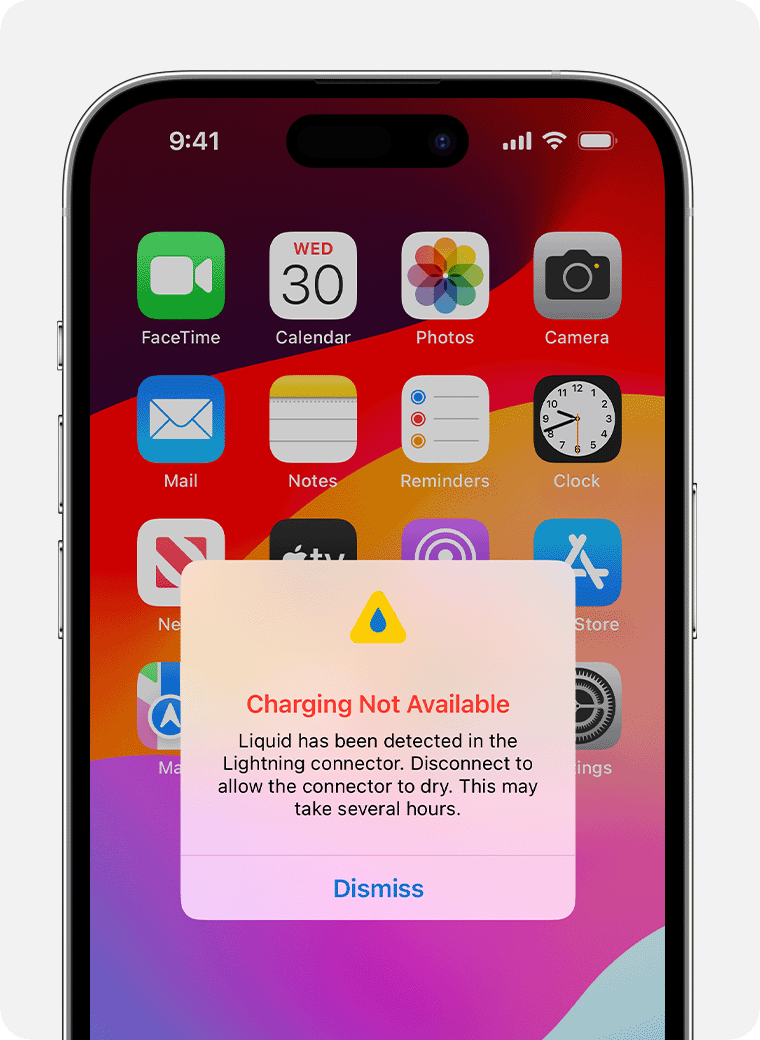
Finding liquid in your charging port can be alarming. Acting fast is crucial to avoid damage. Follow these immediate steps to protect your device and reduce risks.Before doing anything else, it helps to understand how to clean a phone charging port safely so you don’t accidentally cause more damage.
Power Off Device After Liquid Detected in Charging Port
Turn off your device right away. This prevents short circuits and further damage. Do not try to use it while wet.
Removing Excess Water from Charging Port Safely
Gently shake the device to remove water. Avoid blowing air directly into the port. Use a soft cloth to wipe around the opening carefully.
Why You Should Avoid Charging a Wet Charging Port
Do not plug in your charger until the port is fully dry. Charging a wet device can cause serious harm. Wait at least a few hours before trying again.
Using Absorbent Materials for Moisture in Charging Port
Use a dry, soft cloth or tissue to absorb moisture. Do not insert sharp objects or cotton swabs inside. Let the port air dry naturally for the best results.
Credit: support.apple.com
Drying Techniques
Drying a charging port after liquid exposure is important to prevent damage. Proper drying helps keep your device working well. Different methods work best depending on the situation and available tools. Choose a safe and effective drying technique to protect your device.
Air Drying Methods
Air drying is a simple way to remove moisture. Leave your device in a dry place with good airflow. Keep the charging port facing down to help water escape. Avoid shaking the device to prevent liquid spreading inside.
Using Silica Gel Packs
Silica gel packs absorb moisture quickly. Place your device and packs in a sealed container. Let them sit for several hours to pull out moisture. Silica gel is safe and effective for drying electronics.
Avoiding Heat Sources
Heat can damage your device further. Do not use hair dryers or ovens to dry the port. High temperatures may melt internal parts or cause short circuits. Use natural air drying or silica gel instead.
Time Required For Drying
Drying takes time, usually between 24 to 48 hours. Patience is key to avoid rushing the process. Check the port for moisture before trying to charge again. Proper drying reduces the risk of permanent damage.
When To Seek Help
Knowing when to seek help is key after liquid enters your charging port. Acting early can stop bigger damage and save your device. Some signs mean it’s time to get professional help. Ignoring these may worsen the problem.
Signs Of Persistent Issues
Your device may show trouble charging or connecting to power. The charging port might feel warm or look corroded. The phone may shut down unexpectedly or fail to turn on. Strange noises or flickering lights can also appear. These signs mean liquid damage is not gone.
Professional Cleaning Options
Experts use special tools to clean and dry the charging port. They remove corrosion and test internal parts for damage. Professional cleaning improves device safety and performance. Avoid trying to clean with sharp objects or liquids. This can cause more harm than good.
Warranty And Repair Policies
Check your device’s warranty for liquid damage coverage. Many warranties do not cover liquid damage. Repair shops may offer a diagnosis before fixing your device. Authorized service centers use original parts for repairs. Knowing your options helps avoid costly mistakes.
Preventive Tips
Protecting your device from liquid damage in the charging port is essential. Simple habits can prevent costly repairs and keep your device working well. Follow these easy tips to avoid liquid problems in your charging port.
Protective Accessories
Use dust plugs or port covers to shield the charging port. These small accessories block dust, dirt, and liquids. They fit easily and do not affect charging. A case with port protection adds an extra layer of safety. These tools are inexpensive and effective.
Safe Charging Practices
Charge your device in dry places only. Avoid plugging in your device with wet hands. Do not charge near sinks, pools, or outdoors in rain. Always unplug the charger gently to avoid port damage. These habits keep moisture away and protect your device.
Regular Port Maintenance
Check the charging port often for dirt or moisture. Use a dry, soft brush to clean the port gently. Never use sharp or metal objects to clean inside. Keep the port dry by wiping with a soft cloth. Regular care helps maintain proper charging and prevents damage.
Environmental Awareness
Keep your device away from humid or wet environments. Avoid leaving it in bathrooms or kitchens for long. Store your device in dry, cool places. Be careful during rainy weather or near liquids. Awareness of surroundings reduces the risk of liquid entering the port.
Credit: www.reddit.com
Frequently Asked Questions
What Does Liquid In Charging Port Mean?
Liquid in charging port means moisture or water is detected inside the device’s charging area. This can cause charging issues or damage if not addressed quickly.
How To Safely Remove Liquid From Charging Port?
Turn off your device first. Use a dry, soft cloth or gently tap to remove excess liquid. Avoid using heat or inserting objects into the port.
Can Charging Port Liquid Cause Phone Damage?
Yes, liquid in the charging port can cause short circuits or corrosion, leading to permanent device damage if ignored.
How Long To Wait Before Charging After Liquid Exposure?
Wait at least 1-2 hours after drying to ensure no moisture remains in the charging port before charging your device.
Conclusion
Liquid in your charging port can cause serious problems. Acting quickly helps protect your device from damage. Avoid charging your phone until the port is fully dry. Use gentle methods to remove moisture safely. Regularly check and clean the port to prevent future issues.
Taking care of your device keeps it working longer. Stay alert to signs of liquid damage. Small steps make a big difference in phone health.


