
How to Get Liquid Out of Charging Port: Quick & Safe Tips
Have you ever noticed moisture or liquid in your phone’s charging port? It’s frustrating and worrying because even a little water can stop your device from charging or cause damage.
But don’t panic. You can fix this quickly and safely. You’ll learn simple, effective steps to get liquid out of your charging port and protect your device. Keep reading to save your phone and avoid costly repairs.

Credit: www.youtube.com
Signs of Moisture in Charging Port
Noticing liquid in your charging port can prevent serious damage. Early signs help you act fast and protect your device. Learn to recognize these signs and understand the risks. You can also follow how to clean a phone charging port safely to reduce risks early.
Common Symptoms of Moisture in Charging Port
Your device may not charge properly. Charging might stop suddenly or take longer than usual. The charging cable may feel loose or not fit well. You might see small drops of moisture inside the port. Sometimes, the device shows error messages about moisture. You may also notice a strange smell near the charging port.
Potential Risks of Moisture in Charging Port
Liquid in the charging port can cause short circuits. This may damage the battery or the phone’s internal parts. Corrosion can develop over time, leading to permanent failure. The device might overheat or shut down unexpectedly. Ignoring these risks can lead to costly repairs or replacement.
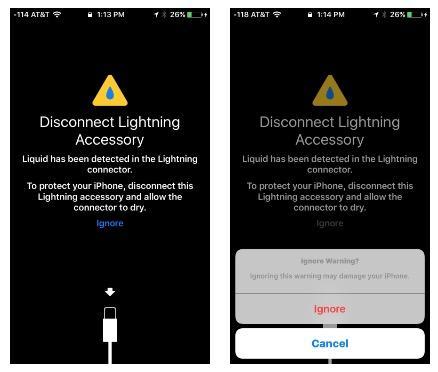
Credit: www.syncwire.com
Immediate Actions to Take for Moisture in Charging Port
Finding liquid in your charging port can cause serious damage. Acting fast helps protect your device. Follow these steps right away to reduce risk and avoid costly repairs.
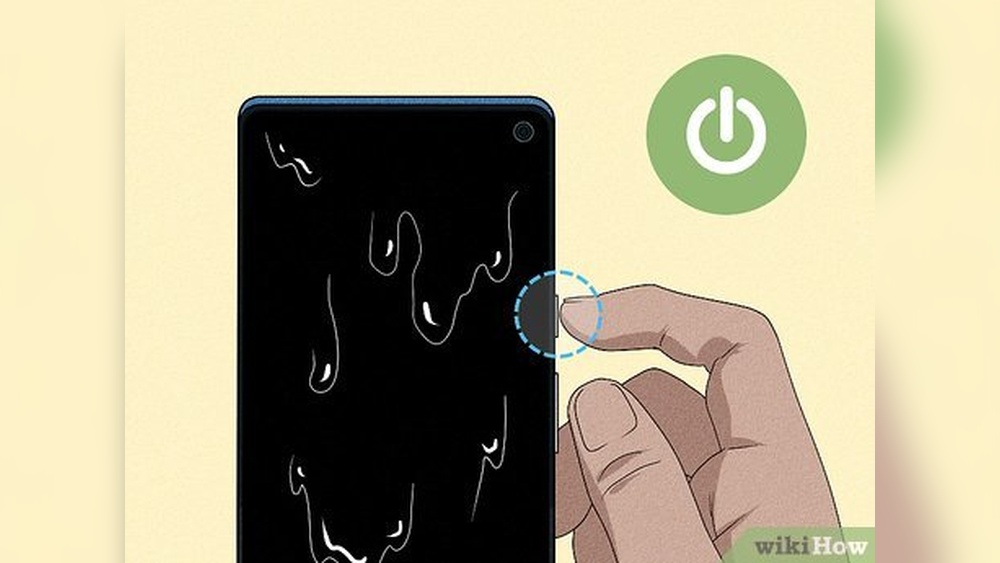
Power Off Device After Moisture in Charging Port Detection
Turn off your device immediately. This stops electricity from flowing inside. Powering off reduces the chance of short circuits. Do not try to restart until the port is dry.
Avoid Charging Wet Charging Port
Do not plug in your charger or use the device. Charging with liquid inside can cause permanent damage. Leave the device alone to dry out fully. Patience is key to protect your phone.
Safe Drying Techniques for Moisture in Charging Port
Safe drying techniques help protect your device from damage after liquid enters the charging port. Quick and careful drying prevents corrosion and maintains the port’s function. Follow gentle methods to avoid pushing liquid deeper inside.
Avoid using hair dryers or heat sources. Samsung also warns that using heat can worsen damage and recommends natural air drying:
https://www.samsung.com/support/mobile-devices/moisture-detected-in-the-charging-port/
Using Soft Cloths to Remove Moisture in Charging Port
Use a soft cloth to gently wipe the charging port’s outside. Avoid pressing hard or inserting cloth fibers inside the port. Microfiber cloths work best. They absorb moisture without scratching the surface.
Do not use paper towels or tissues. These can leave small pieces inside the port. Gently pat the area instead of rubbing. This reduces the risk of pushing liquid further in.
Air Drying Tips for Moisture in Charging Port
Allow the device to air dry in a cool, dry place. Keep the charging port facing down to help liquid drain out. Avoid using hair dryers or heat sources. Heat can damage internal parts.
Leave the device open for several hours or overnight. This gives time for moisture to evaporate naturally. Do not try to charge or turn on the device until fully dry.
Using Silica Gel Packs for Moisture in Charging Port
Silica gel packs absorb moisture quickly and safely. Place your device in a sealed container with several packs. Keep the charging port uncovered for better drying.
Leave the device inside the container for 24 to 48 hours. Silica gel helps pull moisture away from hard-to-reach areas. Avoid rice as it can leave dust or starch inside the port.
Credit: www.businessinsider.com
Tools To Remove Liquid Safely
Removing liquid from a charging port requires care and the right tools. Using proper tools helps prevent damage to your device. It also speeds up the drying process. Avoid pushing the liquid deeper inside. Choose safe and gentle methods to clean the port.
Using Compressed Air
Compressed air is a safe way to remove liquid from the port. It blows out moisture and small debris without touching the device. Use short bursts of air. Hold the can upright to avoid spraying liquid. Keep the nozzle a few inches away from the port. This prevents damage from strong air pressure.
Cotton Swabs And Toothpicks
Cotton swabs help absorb liquid gently. Use dry swabs and do not push hard. Toothpicks can remove dirt or sticky residue carefully. Wrap a small piece of cotton around the toothpick tip. This makes it softer and safer to use. Avoid inserting the toothpick too deep to protect internal parts.
Avoiding Harmful Tools
Avoid using metal objects like pins or needles. They can scratch or break the charging port. Do not use paper towels or cloth that leave fibers inside. Avoid heat sources like hair dryers. They can damage the device or push liquid further in. Stick to safe, non-invasive tools for the best results.
Preventing Future Liquid Damage
Preventing future liquid damage to your device is important. Avoiding water or moisture in the charging port keeps your device safe. Taking simple steps can protect your phone or tablet from costly repairs. Let’s explore easy ways to reduce the risk of liquid damage.
Protective Cases And Covers
Use cases designed to block water and dust from the charging port. Some cases have port covers that seal tightly. These covers stop moisture from entering the device. Choose a case with good protection for everyday use. It helps keep your device dry in rainy or wet places.
Water-resistant Devices
Consider buying a water-resistant device if you often face wet conditions. These devices have special seals to keep water out. They can handle splashes or brief drops in water. Still, avoid exposing them to water for long times. Water-resistant does not mean waterproof.
Safe Handling Habits
Always keep your device away from water sources. Avoid using your phone near sinks, pools, or bathrooms. Dry your hands before touching the device or charger. Do not charge your device in damp places. Small actions can greatly reduce liquid damage risks.
When To Seek Professional Help
Sometimes, removing liquid from a charging port is not enough. Water or other liquids can cause serious damage inside your device. Knowing when to seek professional help can save your device from further harm.
Professional technicians have tools and skills to fix complex problems. Acting quickly can prevent permanent damage and costly repairs.
Signs Of Internal Damage
If your device does not charge after drying, it may have internal damage. Look for strange sounds or burning smells. The screen may flicker or show lines. These signs mean liquid reached parts inside your device.
Also, if the device turns off unexpectedly or won’t turn on, avoid further attempts to charge it. Continuous use can worsen the damage.
Authorized Repair Services
Authorized repair centers use genuine parts for your device. They follow manufacturer guidelines for safe repairs. This ensures your warranty stays valid.
Choose authorized services for reliable and lasting fixes. Their experts can diagnose hidden problems and restore your device properly. Avoid unauthorized repair shops to prevent voiding warranties or getting poor repairs.
Frequently Asked Questions
How To Safely Remove Liquid From Charging Port?
Use a dry, soft cloth or paper towel to gently absorb moisture. Avoid inserting objects that may damage the port. Let the device air dry for several hours before charging to prevent short circuits.
What Household Items Help Dry Charging Ports Quickly?
Silica gel packets and uncooked rice effectively absorb moisture. Place your device in a sealed container with these items for 24-48 hours. Avoid heat sources, as they may damage your device further.
Can I Use A Hairdryer To Dry Charging Ports?
Using a hairdryer on high heat can damage delicate components. If necessary, use the lowest heat setting and keep it at a safe distance. Air drying is generally safer and more effective.
How Long Should I Wait Before Charging Wet Devices?
Wait at least 24 hours to ensure the port is completely dry. Charging too soon can cause short circuits and permanent damage. Patience protects your device’s longevity and functionality.
Conclusion
Water in the charging port can cause serious problems. Act quickly to remove the liquid safely. Use gentle methods like drying with a soft cloth or air drying. Avoid inserting sharp objects that can damage the port. Let the device rest before charging again.
Taking these steps helps protect your phone from harm. Stay calm and handle the situation carefully. Protect your device and keep it working well.


