
Canon T6 Digital Slr Camera: Ultimate Guide for Stunning Photos

Are you ready to explore the full potential of your photography? This Canon T6 DSLR review highlights the camera’s features, ease of use, and image quality for beginners and hobbyists alike. Whether you’re just starting or looking to upgrade, this review shows how the Canon T6 can help you capture stunning, vibrant photos.
Key Features of the Canon T6 DSLR Camera
The Canon T6 offers a solid set of features for beginner photographers. It balances ease of use with quality results. This camera helps users take clear and vibrant photos in many situations.
Check the Canon official T6 product page.
Below are some key features that make the Canon T6 a popular choice for entry-level DSLR users.
Canon T6 DSLR Camera Sensor and Image Quality
The Canon T6 has an 18-megapixel APS-C CMOS sensor. This sensor captures detailed images with good color accuracy. It works well in bright light and moderate low light. The camera produces sharp photos with natural tones. The sensor size helps to create a nice background blur in pictures. Overall, the image quality is very good for its class.
Autofocus and ISO Performance on the Canon T6 DSLR
The autofocus system uses 9 points to focus on subjects quickly. It includes a center cross-type point for better accuracy. This system tracks moving objects with decent precision. Autofocus works well in daylight and indoor lighting. It helps beginners get clear shots without much effort. The camera also offers live view autofocus for easy framing.
Iso Range And Performance
The ISO range of the Canon T6 is 100 to 6400, expandable to 12800. This range lets users shoot in different lighting conditions. Low ISO values create clean images with little noise. Higher ISO settings allow shooting in darker scenes but add some grain. The camera balances noise and detail well at moderate ISO levels.
Built-in Wi-fi And Connectivity
The Canon T6 includes built-in Wi-Fi for easy sharing. Users can connect the camera to smartphones or tablets. This allows quick transfer of photos and remote control of the camera. The connection works through the Canon Camera Connect app. It makes sharing images on social media simple and fast. This feature adds convenience for everyday use.
Canon T6 DSLR Camera Setup Tips for Beginners
Setting up your Canon T6 DSLR camera correctly makes a big difference in your photos. Simple adjustments can improve your shots instantly. These camera setup tips help you get the most from your camera.
Canon T6 DSLR Camera Lenses and Accessories
Choose lenses based on what you want to shoot. A kit lens is good for everyday photos. For portraits, use a lens with a wide aperture. For landscapes, a wide-angle lens works best. Changing lenses changes your photo style.
Customizing Camera Settings
Adjust settings to match your shooting conditions. Set the ISO low for bright light. Increase ISO in darker places. Use a smaller aperture for sharp photos. Adjust shutter speed to control motion blur. Save your settings for quick use later.
Using The Mode Dial Effectively
The mode dial controls how your camera works. Use Auto for simple shooting. Try Portrait mode to blur backgrounds. Landscape mode keeps everything sharp. Use Manual mode to control all settings. Switch modes based on your scene.
Setting Up Autofocus Modes
Select the right autofocus mode for your subject. Use One-Shot AF for still subjects. AI Servo AF tracks moving subjects. AI Focus AF switches between both. Choose the mode that fits your shooting style. Proper autofocus helps capture sharp images.
Mastering Photography Techniques
Learning photography techniques improves your skills and creativity with the Canon T6 DSLR camera. This camera offers many settings to control how your photos look. Understanding these settings helps you take better pictures in different situations.
Practice with your camera. Try changing settings and see how they affect your photos. This way, you can take full advantage of the Canon T6’s features.
Manual Mode Basics on the Canon T6 DSLR Camera
Manual mode lets you control all camera settings. You decide the aperture, shutter speed, and ISO. This mode gives you freedom to create the image you want. Start by adjusting one setting at a time. Watch how each change affects the photo. It takes practice but improves your skills fast.
Aperture and Depth of Field on the Canon T6 DSLR Camera
Aperture controls the size of the lens opening. A large aperture (small f-number) blurs the background. This effect is great for portraits. A small aperture (large f-number) keeps more of the scene sharp. Use this for landscapes. Aperture also controls how much light enters the camera.
Shutter Speed for Action Shots with the Canon T6 DSLR Camera
Shutter speed controls how long the camera sensor is exposed to light. Fast shutter speeds freeze motion. Use these for sports or moving objects. Slow shutter speeds create motion blur. This effect can show movement creatively. Choose the speed that matches your subject.
ISO Settings for Low Light Photography on the Canon T6 DSLR Camera
ISO adjusts the camera’s sensitivity to light. Higher ISO helps in dark places. It makes the sensor more sensitive to light. But high ISO can add noise or grain to photos. Use the lowest ISO possible for clear images. Increase it only when needed to brighten photos.

Credit: www.amazon.com
Creative Photo Ideas Using the Canon T6 DSLR Camera
Creative photo ideas help you explore the full power of the Canon T6 DSLR camera. This camera offers many features that make photography fun and easy. Try different styles to see what works best for you.
Practice these ideas to improve your skills and capture stunning images. The Canon T6 is great for many types of photography, from portraits to close-ups.
Portrait Photography Tips Using the Canon T6 DSLR Camera
Use natural light to make skin tones look soft and warm. Focus on the eyes to create a strong connection with the viewer. Try a shallow depth of field to blur the background. This helps your subject stand out clearly. Experiment with different angles to find the most flattering view.
Landscape Photography Tricks with the Canon T6 DSLR Camera
Use a small aperture for sharp images from front to back. Capture scenes during golden hours for warm, rich colors. Use a tripod to keep the camera steady for long exposures. Include a clear subject like a tree or rock to add interest. Look for leading lines to guide the viewer’s eye through the photo.
Capturing Motion And Sports
Use a fast shutter speed to freeze fast-moving subjects clearly. Try continuous shooting mode to catch the best moment. Focus on the athlete’s face or action point for sharp shots. Use burst mode to capture a sequence of movements. Practice panning to keep moving subjects sharp and backgrounds blurred.
Macro Photography With T6
Get close to small subjects like flowers or insects. Use a macro lens or extension tubes for better detail. Focus carefully on the subject’s most interesting part. Use natural light or a small reflector to brighten shadows. Keep the camera steady with a tripod for sharp close-ups.
Post-processing Workflow for Canon T6 DSLR Photos
Post-processing is an important step after capturing photos with the Canon T6 DSLR camera. It helps improve images and prepare them for sharing or printing. A smooth workflow saves time and keeps your photos looking their best.
Organizing and editing photos on your computer lets you enhance details and fix small issues. Each step in the process adds quality and polish to your images.
Transferring Photos To Pc
Connect your Canon T6 camera to your PC using a USB cable. Alternatively, remove the SD card and use a card reader. Copy the image files to a dedicated folder. Name folders by date or event for easy access. This keeps your photos organized and easy to find.
Basic Editing Tools
Use simple editing software to crop, straighten, and rotate photos. Adjust brightness and exposure to fix dark or light images. Remove red-eye and small blemishes for a cleaner look. Basic edits prepare your photos for more detailed adjustments.
Enhancing Colors And Contrast
Increase color vibrancy to make images pop. Adjust contrast to add depth and detail. Use sliders gently to avoid unnatural effects. Pay attention to skin tones and natural colors. Balanced colors make your photos more appealing and realistic.
Exporting For Web And Print
Save your edited photos in the right format. Use JPEG for web sharing with good quality and small file size. Choose TIFF or high-quality JPEG for printing. Resize images to fit the platform or print size. Proper exporting ensures your photos look great everywhere.
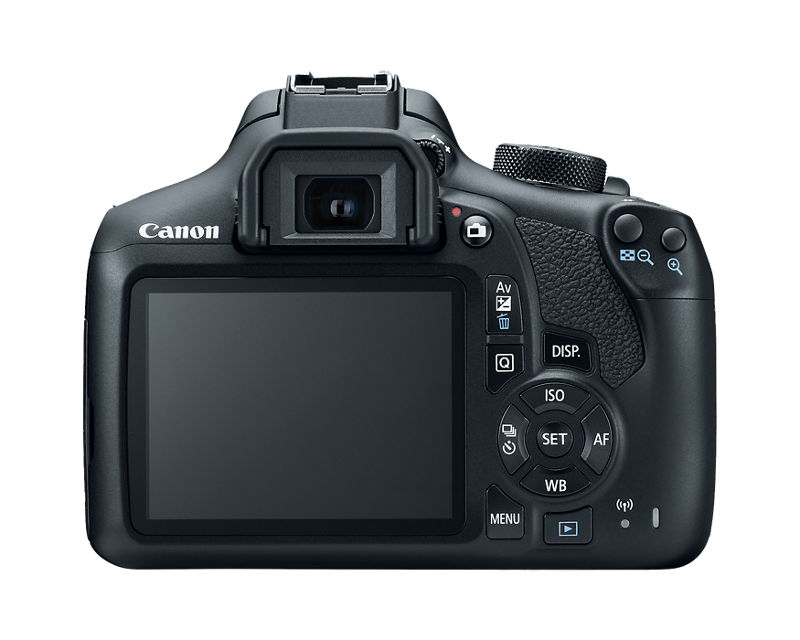
Credit: www.usa.canon.com
Troubleshooting And Maintenance
Owning a Canon T6 Digital SLR Camera means regular care and quick fixes keep it working well. Troubleshooting and maintenance help avoid bigger problems and improve photo quality. Simple steps can make your camera last longer and perform better.
Common Issues And Fixes
The Canon T6 may face issues like blurry photos or error messages. Check the lens for dirt or smudges to fix blurry images. If the camera shows an error, remove and reinsert the battery. Resetting settings to default can solve many problems. For autofocus problems, clean the lens contacts gently with a soft cloth.
Cleaning Your Camera Gear
Clean the camera body with a soft, dry cloth to remove dust. Use a blower brush to clear dust from the sensor and lens. Avoid touching the lens surface with fingers. Use lens cleaning solution and a microfiber cloth for stubborn spots. Store the camera in a dry place to prevent moisture damage.
Battery Care And Storage
Charge the battery fully before use to get the best performance. Avoid letting the battery drain completely before recharging. Remove the battery if you won’t use the camera for a long time. Store batteries in a cool, dry place away from direct sunlight. Use only Canon-approved batteries for safety and reliability.
Firmware Updates
Firmware updates improve camera functions and fix bugs. Check Canon’s official website regularly for updates. Follow the instructions carefully to install updates without errors. Keep the camera battery charged during firmware updates. Updated firmware helps your Canon T6 work smoothly and stay compatible with new accessories.
Accessories To Boost Performance
The Canon T6 Digital SLR Camera performs better with the right accessories. These tools help you take clearer photos and shoot smoothly. Accessories expand your camera’s capabilities. They also make your photography experience more enjoyable and effective.
Recommended Lenses
The Canon T6 works well with many lenses. A prime lens like the 50mm f/1.8 offers sharp images and good low-light shots. A zoom lens, such as the 18-55mm kit lens, covers wide to close-up views. For nature or sports, a telephoto lens brings distant subjects closer. Choosing the right lens improves image quality and creativity. Canon T6 DSLR review
Tripods And Stabilizers
Tripods keep your camera steady for sharp pictures. They are essential for long exposure and night photography. Stabilizers help reduce shake during video recording. A small, lightweight tripod fits easily in your camera bag. Stabilizers make your videos smooth and professional-looking.
External Flashes
The built-in flash on the Canon T6 has limits. An external flash provides more light and better control. It helps in dim places and avoids harsh shadows. You can angle the flash for softer light effects. External flashes improve photo brightness and quality. Canon T6 DSLR review
Memory Cards And Storage
Memory cards store your photos and videos. Choose cards with high speed for fast writing and reading. SDHC or SDXC cards with at least 16GB space are good options. Backup your files regularly to avoid data loss. Extra cards keep you ready for long photo sessions.

Credit: www.amazon.com
Frequently Asked Questions
What Are The Key Features Of Canon T6 Dslr Camera?
The Canon T6 features an 18MP APS-C sensor, DIGIC 4+ processor, and 9-point AF system. It supports Full HD 1080p video and built-in Wi-Fi for easy sharing.
Is Canon T6 Good For Beginner Photographers?
Yes, Canon T6 is ideal for beginners. It offers user-friendly controls, guided modes, and quality image output. Its affordable price makes it perfect for new photographers.Canon T6 DSLR review
How Does Canon T6 Perform In Low Light?
Canon T6 performs well in low light with an ISO range of 100-6400, expandable to 12800. Its sensor and processor reduce noise for clearer shots.
Can Canon T6 Record High-quality Videos?
Yes, Canon T6 records Full HD 1080p videos at 30fps. It provides decent video quality suitable for casual filming and vlogging.Canon T6 DSLR review
Conclusion
The Canon T6 DSLR camera offers solid image quality and easy controls. It suits beginners and hobbyists well. The camera feels comfortable to hold and use. Battery life lasts long enough for most photo sessions. You get good value for a reasonable price.
Compact size makes it easy to carry anywhere. This camera helps capture special moments clearly. A reliable choice for those starting photography. Simple features let you learn and grow skills. A camera worth considering for everyday use.Canon T6 DSLR review


